
An LLM-native desktop workbench for professional translators
Stop juggling Trados, ChatGPT and Excel. A single workbench covers LLM-native translation, terminology, style, translation memory and QA.
Why we built this solution
The core architecture of Trados, MemoQ and Phrase still reflects the 2010-era statistical-memory worldview; LLMs are bolted on as plugins. The result: professional translators bounce between the CAT tool, ChatGPT, Excel glossaries and Word layout.
Our answer is to redesign the translator workflow from scratch with LLMs as the starting point. Terminology, style, memory, prompt templates, multi-round polish and reviewer feedback all live inside one desktop workbench, so the translator can focus on translating.
Who this is for
Freelance translators
Technical, legal, medical and literary domains
Tool-switching fatigue, term inconsistency, ChatGPT amnesia
Small language service providers
5-50 person LSPs
High Trados licensing cost, awkward LLM integration
Enterprise language teams
In-house localization teams at multinationals
Hard to enforce brand terms and style, painful compliance review
Subtitles & content localization
Gaming, video and e-commerce outbound teams
Context continuity, voice consistency, throughput
The workflows this solution covers
Technical documentation
- API docs, user manuals and whitepapers — EN↔ZH, EN↔JA
- Strict term guardrails + LLM stylistic rewriting
Legal & contract translation
- Contracts, agreements, patent filings
- Term consistency and legal-prose rigor
Gaming & subtitle localization
- Multi-language subtitle generation and QA
- Context continuity and character-voice consistency
Marketing content across languages
- Brand copy, product descriptions, outbound ads
- Brand-tone-preserving LLM rewriting
What the workbench actually does
Every capability has been hardened in real projects — not a slideware promise, but engineering that ships to production.
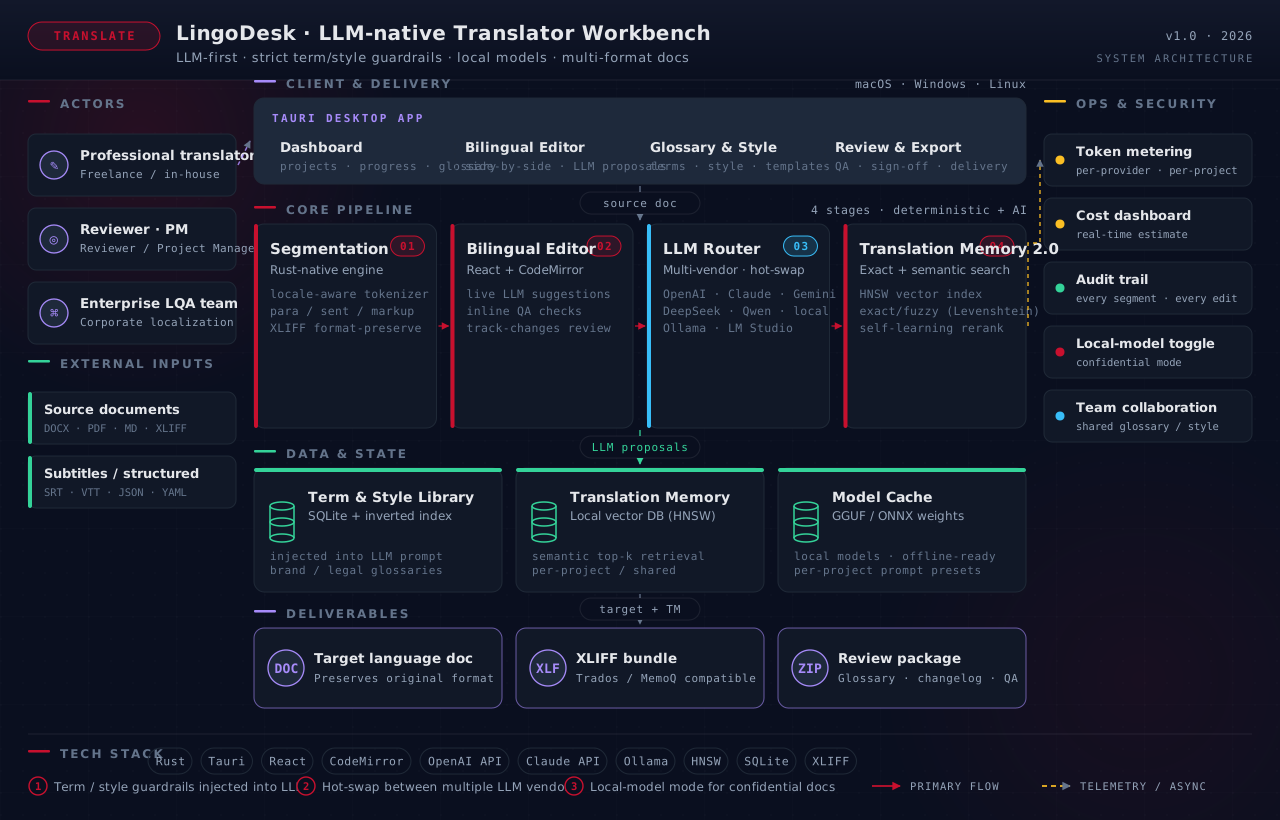
- LLM-native editor: bilingual side-by-side editor with live AI suggestions and multi-round rewriting
- Terminology & style library: locked terms and preset styles that the LLM is forced to follow
- Translation Memory 2.0: classic TM + semantic retrieval to surface prior work with similar meaning
- Multi-format import: Word, PDF, Markdown, subtitles (SRT/VTT), JSON/YAML, XLIFF
- Multi-LLM routing: OpenAI, Claude, Gemini, DeepSeek and Qwen — swap or compare freely
- Local-model support: Ollama / LM Studio integration for confidential documents
- Team collaboration: shared glossary and style library, multi-user collaboration on the same project
End-to-end system architecture
How our approach differs from the alternatives
Before you decide, you probably want to ask
How is this different from translating with ChatGPT directly?
ChatGPT has no term memory, no style lock-in, no document-structure preservation and no TM. We build the engineering layer professional translators need around the LLM, so the LLM actually serves the professional workflow.
Is it cheaper than Trados?
Pricing lands at roughly a third of Trados Freelance annual fees, while delivering LLM-native capabilities and a modern UI.
Can I use it on confidential documents?
Yes. Via Ollama or LM Studio you can run fully local models so the translation process never touches any cloud endpoint — fit for regulated industries such as legal, government and finance.
Bring your translation workflow from 2010 to 2026
Tell us your scenario and requirements — a specialist will reach out within one business day with an initial solution sketch and a feasibility read.